Partition Elimination with Power BI – Part 3, Integers
- Partition Elimination with Power BI – Part 1, Overview
- Partition Elimination with Power BI – Part 2, Dates & DateTimes
- Partition Elimination with Power BI – Part 3, Integers
In part 1 and part 2 of this series we looked at how the SQL generated by Power BI in combination with the data type of the partition key in the source data can impact the likelihood of partition elimination taking place. We also discussed how the SQL statements generated by M & DAX convert date/datetime data types:
- DAX converts any flavour of date/datetime to a SQL datetime data type.
- Power Query converts any flavour of date/datetime to a SQL datetime2 data type.
| Partition Key Data Type | Date Filter Expression Language | Partition Elimination Possible | Expression Langauge Data Type Conversion |
|---|---|---|---|
| date | M | No | datetime2(7) |
| date | DAX | No | datetime |
| datetime | M | No | datetime2(7) |
| datetime | DAX | Yes | datetime |
| datetime2(7) | M | Yes | datetime2(7) |
| datetime2(7) | DAX | No | datetime |
| datetime2(other) | M | No | datetime2(7) |
| datetime2(other) | DAX | No | datetime |
| int | M | Yes | int |
| int | DAX | Yes | int |
Working with Integers
A fairly common way to implement dates/date partitioning on large fact tables in a data warehouse is to use integer fields for the partition key (e.g. 20191231). The good news is that both M and DAX will pass a predicate on the partition key through to SQL with no fundamental change to the data type i.e. partition elimination takes place as expected, joy!
The example below uses a simple measure against a DirectQuery data source, partitioned on an integer field.
Table Definition
create table dbo.MonthlyStuffInt (
  MonthDateKey int not null,
  TotalAmount decimal(10, 5) not null,
  index ccix_MonthlyStuffInt clustered columnstore)
on psMonthlyInt(MonthDateKey);
Power BI
In Power BI I have a slicer on the MonthDateKey column and a measure displayed in a card visual that sums TotalAmount.
Total Amount = SUM ( MonthlyStuff[TotalAmount] )

SQL Generated by Power BI
Using DAX Studio or Azure Data Studio to trace the above, I can capture the following SQL generated by the DAX expression:
SELECT SUM([t0].[Amount])
 AS [a0]
FROM
(
(select [_].[MonthDateKey] as [MonthDateKey],
    [_].[TotalAmount] as [Amount]
from [dbo].[MonthlyStuffInt] as [_])
)
 AS [t0]
WHERE
(
[t0].[MonthDateKey] = 20160501
)
Execution Plan
If I execute the query in SSMS, I can see that partition elimination takes place.

That all looks good, right?
It does indeed but we’d generally use a date dimension table to improve the browsability of the data model and when doing so, we could lose the partition elimination functionality we see above.
In the below example I have set up a date dimension table, related to a fact table, both using DirectQuery as the storage mode. To improve the browsability of the data model I’ve used the MonthYear field from the date dimension in the slicer, something I suspect is much more representative of the real world.
Table Definition
create table
   dbo.DimDate (
    DateKey int not null primary key clustered
    ,Date date not null
    ,MonthYear nchar(8) not null
  )
Power BI
Relationships

Visuals

SQL Generated by Power BI
SELECT SUM([t0].[Amount])
 AS [a0]
FROM
((select [_].[MonthDateKey] as [MonthDateKey],
    [_].[TotalAmount] as [Amount]
from [dbo].[MonthlyStuffInt] as [_]) AS [t0]

 inner join

(select [$Table].[DateKey] as [DateKey],
    [$Table].[Date] as [Date],
    [$Table].[MonthYear] as [MonthYear]
from [dbo].[DimDate] as [$Table]) AS [t1] on
(
[t0].[MonthDateKey] = [t1].[DateKey]
)
)

WHERE
(
[t1].[MonthYear] = N'Jun-2016'
)
Unfortunately, the generated SQL statement does not use partition elimination when querying the large fact table.
Workaround
One way to invoke partition elimination and improve the query performance of the underlying SQL is to introduce a cross-island relationship between the dimension table and the fact table in Power BI.

Put simply, by introducing the cross-island relationship Power BI will bypass the join to the Date dimension table in the underlying SQL and instead, the value/s of the relationship field (DimDate[DateKey]) will be passed directly to the fact table as part of the generated DirectQuery SQL.
SQL Generated by Power BI
SELECT SUM([t0].[Amount])
 AS [a0]
FROM
(
(select [_].[MonthDateKey] as [MonthDateKey],
    [_].[TotalAmount] as [Amount]
from [dbo].[MonthlyStuffInt] as [_])
)
 AS [t0]
WHERE
(
([t0].[MonthDateKey] IN (20160612,20160626,20160613
,20160627,20160614,20160601,20160615,20160628
,20160602,20160629,20160603,20160616,20160630
,20160617,20160604,20160618,20160605,20160619
,20160606,20160620,20160607,20160621,20160608
,20160609,20160622,20160623,20160610,20160624
,20160611,20160625))
)
A somewhat controversial recommendation as it’s in direct conflict with the Power BI documentation for filter propagation performance. My experience, especially in the context of large partitioned fact tables, is that the improvement you see in the data retrieval times from large fact tables (as a direct result of the ‘fact table only’ SQL statement and subsequent partition elimination) far outweighs any additional work required elsewhere.
To introduce this relationship type, change the storage mode of the date dimension table to Import.

Before:
Intra-Island Relationship (Date Dimension using DirectQuery, Fact using DirectQuery)

Profiled Query
SELECT SUM([t0].[Amount])
 AS [a0]
FROM
((select [_].[MonthDateKey] as [MonthDateKey],
    [_].[TotalAmount] as [Amount]
from [dbo].[MonthlyStuffInt] as [_]) AS [t0]

 inner join

(select [$Table].[DateKey] as [DateKey],
    [$Table].[Date] as [Date],
    [$Table].[MonthYear] as [MonthYear]
from [dbo].[DimDate] as [$Table]) AS [t1] on
(
[t0].[MonthDateKey] = [t1].[DateKey]
)
)

WHERE
(
[t1].[MonthYear] = N'Jun-2016'
)
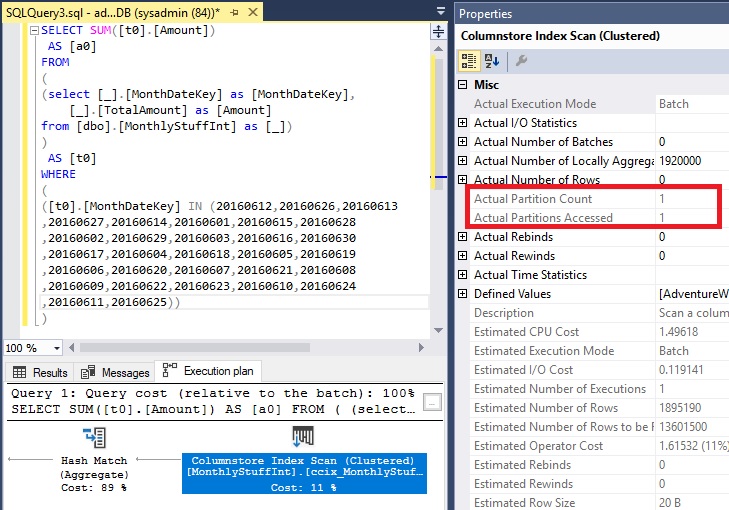
Partition Elimination does not take place

After:
Cross-Island Relationship (Date Dimension using Import Storage Mode, Fact using DirectQuery)
Profiled Query
SELECT SUM([t0].[Amount])
 AS [a0]
FROM
(
(select [_].[MonthDateKey] as [MonthDateKey],
    [_].[TotalAmount] as [Amount]
from [dbo].[MonthlyStuffInt] as [_])
)
 AS [t0]
WHERE
(
([t0].[MonthDateKey] IN (20160612,20160626,20160613
,20160627,20160614,20160601,20160615,20160628
,20160602,20160629,20160603,20160616,20160630
,20160617,20160604,20160618,20160605,20160619
,20160606,20160620,20160607,20160621,20160608
,20160609,20160622,20160623,20160610,20160624
,20160611,20160625))
)
Partition Elimination takes place and we see a reduction in CPU and reads. The simplified query plan also came with the added benefit of aggregate pushdown on the columnstore index which would contribute to the improvement in performance.
Conclusion
If you are using a dimension table to improve the browsability of the data model, and you want to harness partition elimination to improve query performance in DirectQuery against very large fact tables then consider introducing a cross-island relationship between the dimension table and the fact table. This can be achieved by setting the dimension table to use Import mode. Familiarise yourself with the limitations before doing so and as always, profile your queries to ensure you’re obtaining optimal performance from your solution because one size never fits all.

James Pretorius editor
James is a data platform professional with extensive experience in designing, implementing and supporting Business Intelligence solutions. He has a strong set of core skills in data and analytics, supported by a deep understanding of technical and architectural principles across the wider IT ecosystem. James has worked across a range of industries with both SMEs and large enterprises. He enjoys translating client needs into technical solutions, with an approach that is always personable and client focused.




About the author