Partition Elimination with Power BI – Part 2, Dates & DateTimes
- Partition Elimination with Power BI – Part 1, Overview
- Partition Elimination with Power BI – Part 2, Dates & DateTimes
- Partition Elimination with Power BI – Part 3, Integers
In part 1 of this series we looked at how the SQL generated by Power BI, in combination with the data type of your partitioned columns in the source data, can impact the likelihood of partition elimination taking place. We also discussed how the SQL statements generated by M & DAX convert date/datetime data types:
- DAX converts any flavour of date/datetime to a SQL datetime data type.
- Power Query converts any flavour of date/datetime to a SQL datetime2 data type.
| Partition Key Data Type | Date Filter Expression Language | Partition Elimination Possible | Expression Langauge Data Type Conversion |
|---|---|---|---|
| date | M | No | datetime2(7) |
| date | DAX | No | datetime |
| datetime | M | No | datetime2(7) |
| datetime | DAX | Yes | datetime |
| datetime2(7) | M | Yes | datetime2(7) |
| datetime2(7) | DAX | No | datetime |
| datetime2(other) | M | No | datetime2(7) |
| datetime2(other) | DAX | No | datetime |
| int | M | Yes | int |
| int | DAX | Yes | int |
In this post, I’ll dig a little further into the detail and demonstrate the issue at hand with the use of some code snippets when working with a date column.
Setup
I have a SQL table shoved with some test data that I’ve partitioned by date (monthly) as follows:
create partition function pfMonthly (date)
as range right for values(
 '20190101','20190201'
,'20190301','20190401'
,'20190501','20190601'
);
create partition scheme psMonthly
 as partition pfMonthly all to ([PRIMARY]);
create table dbo.MonthlyStuff (
  MonthDateKey date not null
  , TotalAmount decimal(10, 5) not null
  , index ccix_MonthlyStuff clustered columnstore
) on psMonthly(MonthDateKey);
Power Query (M) –
Using the import storage mode, the following Power Query statement is used to filter a monthly slice of the data in Power BI.
let
    Source = Sql.Databases("mydbserver.database.windows.net"),
    mydb= Source{[Name="mydb"]}[Data],
    dbo_MonthlyStuff = mydb{[Schema="dbo",Item="MonthlyStuff"]}[Data],
    #"Filtered Rows" = Table.SelectRows(dbo_MonthlyStuff
      , each ([MonthDateKey] = #date(2019, 2, 1)))
in
    #"Filtered Rows"
Query folding takes place, producing the following native query (below). Note the correct data type (date) has been detected by Power Query however the native SQL query converts the filter to a datetime2:

Power Query Native Query – datetime2 Conversion
If I plug the generated SQL into SQL Server Management Studio and view the execution plan I can see that partition elimination does not take place against my partitioned table.
select
  [_].[MonthDateKey]
  , [_].[TotalAmount]
from
  [dbo].[MonthlyStuff] as [_]
where
  [_].[MonthDateKey] = convert(datetime2, '2019-02-01 00:00:00')

This is due to the misalignment of the data type in the predicate of the SQL statement (generated by M) with that of the data type of the partition key in the database. The source partition key is using the SQL date datatype and the SQL generated by M is casting the field to a datetime2.
To demonstrate this further, if I change the query manually in SSMS to use date conversion, partition elimination takes place resulting in much lower CPU and I/O overhead.
select
  [_].[MonthDateKey]
  , [_].[TotalAmount]
from
  [dbo].[MonthlyStuff] as [_]
where
  [_].[MonthDateKey] = convert(date, '2019-02-01 00:00:00')

Profiler Statistics without Partition Elimination
CPU: 4250000
Reads: 45684
Profiler Statistics with Partition Elimination
CPU: 578000
Reads: 4274
DAX
Now let’s demonstrate the issue using DAX with DirectQuery. If I use DirectQuery storage mode in Power BI and run a calculation against the underlying partitioned table, filtered to a particular month, I see a similar issue.
In Power BI I have a slicer on the MonthDateKey column (set as a date datatype) and a measure, that sums TotalAmount, displayed in a card visual.

Total Amount =
SUM ( MonthlyStuff[TotalAmount] )
The following SQL is generated by the DAX expression when using DAX Studio or Azure Data Studio to trace the above.
SELECT SUM([t0].[TotalAmount])
 AS [a0]
FROM
(
(select [$Table].[MonthDateKey] as [MonthDateKey],
    [$Table].[TotalAmount] as [TotalAmount]
from [dbo].[MonthlyStuff] as [$Table])
)
 AS [t0]
WHERE
(
[t0].[MonthDateKey] = CAST( '20190201 00:00:00' AS datetime)
)
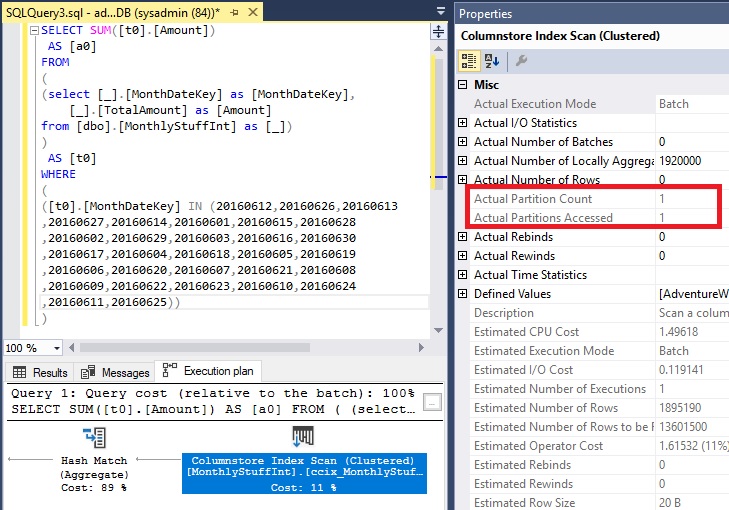
As you can see from the below, once again we fail to harness the power of partition elimination. This is due to the misalignment of the data type in the predicate of the SQL statement (generated by DAX) and the data type of the source column. Partition elimination does not take place because the source column is using the SQL date datatype and the SQL generated by DAX is casting to a datetime data type.

To demonstrate this further, if I change the query manually in SSMS to use date conversion, partition elimination takes place and results in much lower CPU and I/O overhead.
SELECT SUM([t0].[TotalAmount])
 AS [a0]
FROM
(
(select [$Table].[MonthDateKey] as [MonthDateKey],
    [$Table].[TotalAmount] as [TotalAmount]
from [dbo].[MonthlyStuff] as [$Table])
)
 AS [t0]
WHERE
(
[t0].[MonthDateKey] = CAST( '20190201 00:00:00' AS date)
)

Profiler Statistics without Partition Elimination
CPU: 1640000
Reads: 27681
Profiler Statistics with Partition Elimination
CPU: 266000
Reads: 4274
Conclusion
If you want to harness partition elimination to improve query performance in DirectQuery mode and reduce load times in Import mode, then it’s worth keeping in mind how DAX and M convert the various date/datetime data types in the underlying SQL. As always, profile your queries and ensure they are performant before you commit.
In part 3 of this series we’ll look at partitioned tables that use an integer as the date partition key, a common practice in data warehousing.

James Pretorius editor
James is a data platform professional with extensive experience in designing, implementing and supporting Business Intelligence solutions. He has a strong set of core skills in data and analytics, supported by a deep understanding of technical and architectural principles across the wider IT ecosystem. James has worked across a range of industries with both SMEs and large enterprises. He enjoys translating client needs into technical solutions, with an approach that is always personable and client focused.





About the author